Create an Ethogram
An ethogram is your behavioral observation protocol, structured into a format that WildNotes can code against. It is the full set of instructions WildNotes follows to decide which behaviors are present in your transcribed voice notes, so the more details you put into it, the better your results.
You probably already have one, whether it's in a spreadsheet, on a paper data sheet, or in your head. This guide explains how to format that into a WildNotes ethogram.
Need support?
Building a detailed ethogram shapes how well WildNotes understands your voice notes, and it usually takes a few rounds of tweaking to get right. If you'd like any help getting set up, please don't hesitate to reach out to our team!
Ethogram fields and structure
Every behavior in an ethogram has the following fields:
| Field | What it's for | Example |
|---|---|---|
| Name* | Name of the behavior, and the column header in your export | travel, group_size, calf_present |
| Description* | The definition WildNotes codes against, so write it the way you'd explain it to a new field assistant: what counts, what doesn't, how it differs from similar behaviors, and for counts or measurements, how to record the value (units, what to do with a range) | "Directional movement with surfacings on a consistent heading. Not travel if the animals are milling, feeding, or socializing, even when moving." |
| Value type* | The type of data value you are looking to record for this behavior | yes/no · a number · free text · category |
| Behavior type | Whether it happens at a moment or holds over time. Point: a moment, like a breach. State: holds over time, like resting, or a count or condition, like group size | Point · State |
| Required | Whether this behavior is required or optional in your protocol | Optional · Required |
| Keywords | Specific words that signal and represent this behavior | "traveling", "heading north", "on the move" |
| Example phrases | Longer examples of phrases from real notes that should count as this behavior. WildNotes matches similar wording, not just the exact words | "three animals, tight group, heading north", "mother and calf moving quickly now" |
| Negative phrases | Phrases that sound close but should not trigger it | "holding position, no clear heading" |
| Internal notes | Notes for your team only. WildNotes doesn't read them when it codes, so put behavioral coding instructions in the description | "Added for the 2026 season; revisit after pilot" |
*Required. The other fields are optional, but the more you include, the more accurate your results.
Three ways to start
First, go to the Ethograms tab in WildNotes.
1. Start from a template
The easiest way to get started quickly. Pick the built-in template closest to your study (Marine Mammal, Bird, or General Animal Behavior) and build upon that to make it your own.
- Open the template and choose Use this template (or Use as template, if your group already has ethograms). This makes an editable copy for your group.
- Choose Edit.
- Rename, delete, and add behaviors until it matches your protocol. Rewrite the descriptions and example phrases in the words your group uses.
- Choose Save Ethogram.
2. Build it from scratch
This option might be best if your protocol looks nothing like the templates.
- Choose New Ethogram, give it a name and a short description, then Create Ethogram.
- Choose Edit, then Add Behavior for each behavior or field you record.
- Fill in the details for each behavior (see What an ethogram holds).
- Choose Save Ethogram.
3. Use an existing CSV or JSON file
Already formatted for WildNotes
If you have an earlier version of an ethogram you already downloaded from WildNotes:
- Choose New Ethogram and give it a name.
- Choose Import file, or Paste JSON or CSV and paste it in.
- Choose Create Ethogram, then review it and adjust anything that needs it.
Convert an existing file with an AI assistant
If you're comfortable using AI assistants (such as ChatGPT, Claude, or Gemini), they may be able to quickly convert your existing spreadsheet or JSON to something WildNotes can use:
-
Open one of the built-in templates and click the download button next to the Edit and Delete buttons. This saves the template as a JSON file.

-
Upload that JSON file and your list of behaviors (it can be CSV, JSON, or even a simpler list format to get started) in a new chat with your AI assistant. You do not need to share any recordings or data.
-
Ask it to generate a new JSON file with the same structure as the template, but with your behaviors. You can copy this prompt and fill in the [brackets] with the details for your research:
I'm setting up an ethogram for WildNotes, a tool that codes behaviors from field voice notes. Attached are two files: a WildNotes ethogram template (JSON) and my own list of behaviors. I study [species] doing [kind of fieldwork, e.g. boat-based focal follows]. Write a new WildNotes ethogram JSON for my behaviors: - Keep exactly the same structure and field names as the provided template. - Make one entry per behavior on my list. Don't add behaviors I didn't list. - Name: short, lowercase, with underscores, e.g. "group_size". - Description: what counts as this behavior and what doesn't, in plain language. - Keywords: the words and shorthand someone would say aloud in the field. - Example phrases (utterance examples): 3 to 5 short phrases that sound like real spoken field notes. - Value type: use only the value types that appear in the template, and pick the one that fits (for example yes/no for a behavior, a number for a count). If anything on my list is unclear, ask me before writing the file. Then give me only the JSON, so I can save it as a .json file. -
When you have your JSON file, go back to the Ethograms tab and click New Ethogram, then Paste JSON or CSV (or save it as a
.jsonfile and Import file). Review and adjust it there.
Writing behavior descriptions that code well
- Say what you'd say to a new field assistant. Be as detailed as you like, and as customized to your study and team's vernacular. WildNotes has no context beyond your description and the transcript.
- Include the negatives. Hints like "Do not code this behavior if I say, ..." can help prevent false positives.
- One behavior, one idea. If a description has "or" in it, consider splitting it into two behaviors.
- Include lists of common acronyms. If you have a list of common shorthand acronyms (whether that's for individual or group IDs, behavioral or environmental codes), include them for the relevant behaviors. WildNotes can look specifically for those acronyms, reducing transcription errors. This can go either in the behavior's Description or as Value examples under Value Type.
Which ethogram a session uses
You can select which ethogram you'd like to use to code your recordings when you upload them.
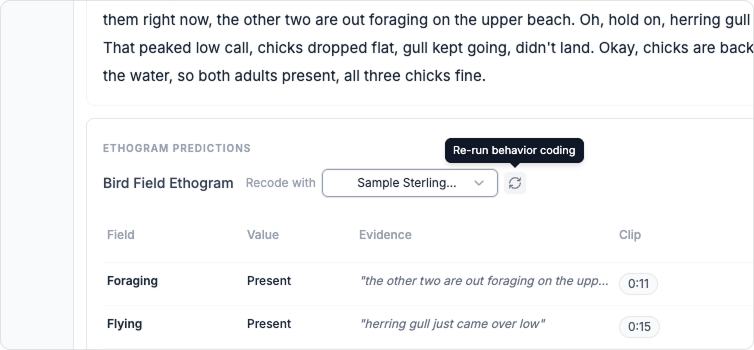
If you've made changes or created a new ethogram, you do not need to re-upload or re-transcribe the files. On the review page for a single recording, you can choose to re-code with a new ethogram here: